Backup and Backup Retention Policy Template

Backup Policy & Backup Retention

Order PolicySample Policy

IT organizations of all sizes contend with a growing data footprint with more data to manage, protect, and preserve for longer periods of time. Online primary storage, has focus a on fast low latency, reliable access to data while near-line secondary storage has a focus on low cost and high capacity. Long-term data retention requires a combination of ultra-low cost, good performance during storage and retrieval, and reduced footprint in terms of power, cooling, floor-space and economics (PCFE) - also known as a small green footprint - for inactive data.

The Backup and Backup Retention Policy Template has been used to create customized policies for well over 2,000 enterprises world wide. This policy in concert with the Record Mangement Policy Template are must have Best Practices Tools for CIOs and IT professionals.

For example, factors that CIOs and IT professionals need to consider for backup retention include:

  • Business and regulatory requirements – regulatory compliance and data preservation
  • Economic and budgetary concerns – doing more with less
  • Data loss prevention and information protection – protect, preserve and serve
  • Environmental and business sustainment – green and economically efficient
  • Maximize IT resource effectiveness and return on investment (ROI)
  • Reduce total cost ownership (TCO) of IT resources and service delivery

Order PolicySample Policy

  • Accidental or malicious deletion of critical data - Requirement that provides the ability to quickly and easily restore individual files and folders.
  • Data that is lost or corrupted over a period of time - Requirement to roll back individual records to fix  database corruptions. The ability to recover data from any previous point in time, and have it as granular as possible.
  • A crashed disk - Requirement to recover a disk volume is different than recovering a single file, but it should be done just as quickly, and with automation to help keep operational disruptions to a minimum.
  • A server failure - Requirement to restore operations when replacing a broken server may be complicated by the need to install different drivers on the new system if the hardware is not an exact match. It helps to have the capability to move the application workload to a standby server (with different hardware) or virtual server while the system is being replaced or repaired.
  • A local or regional disaster - Requirement when you lose an entire office to fire, flood, or other disaster, have a current copy of your important information in another location that is outside the disaster zone.
  • Remote offices and branch offices - Requirement  to have a process in place to restore with minimal technical support as remote and branch offices often do not have the luxury of having an on-site technical resource to assist in backups and restores.
  • Resource-intensive backup processes - Requirement frequent or even continuous backup that is not resource-intensive .
  •  Security breaches - Requirement to secure data. When moving data between sites, it needs to be protected from potential security breaches. A breach of data security, whether actual damage is done or not, can be devastating to your company's reputation, as dozens of large enterprises and government agencies have found in recent years.

The Backup and Backup Retention policy is an 11 page sample policy that is a complete policy which can be implemented immediately. 

The document is provided in both Word 2003 and Word 2007 format and is easily modified.  This policy is included in the Disaster Recovery / Business Continuity Template.

Order PolicySample Policy

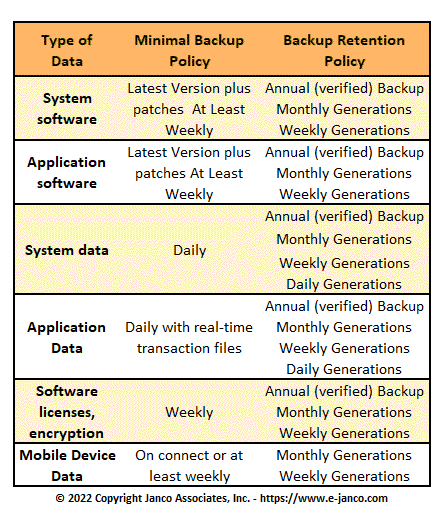
Below is a table from the policy:

Type of Data

Minimal Backup Policy

Backup Retention Policy

System software

Latest Version plus patches
 At Least Weekly

Annual (verified) Backup
Monthly Generations
Weekly Generations

Application software

Latest Version plus patches
At Least Weekly

Annual (verified) Backup
Monthly Generations
Weekly Generations

System data

Daily

Annual (verified) Backup
Monthly Generations
Weekly Generations
Daily Generations

Application Data

Daily with real time transaction files

Annual (verified) Backup
Monthly Generations
Weekly Generations
Daily Generations

Software licenses, encryption keys, & Protocol Data

Weekly

Annual (verified) Backup
Monthly Generations
Weekly Generations

Order PolicySample Policy

Data Deduplication - Cost Savings Potential

It is estimated by some that corporate data has grown by 25% in 2009 after several years of increases at two to three times that rate. When you combine this with flat to decreasing IT budgets, something eventually has to give. Companies are now forced to make a choice. They will have to either keep buying more storage - which means other budgeted items go unfunded -and deal with the increased operating costs associated with managing more devices, such as power, cooling, and data center space or reduce the amount of data retained, which could impact compliance, recovery service level agreements, and business intelligence initiatives. Data deduplication approaches offer IT a hybrid alternative, which is to remove redundant content before it is ultimately stored - eliminating most of the downstream negative effects, which capacity would cause.

The gains in capacity savings provide customers with much more optimistic outcomes, such as the ability to retain more “virtual” and true information online for longer periods, dramatically lowering the operating impact of supporting that data and enhancing data protection operations with disk. These outcomes can lead to huge downstream financial benefits, such as moving corporate archives from tape to disk to assist corporate counsels in responding to electronic discovery requests.

For example, in a 2009 survey, approximately 60% of U.S.-based trial attorneys reported having cases that raise electronic discovery issues. Of that group, over 86% have issued or received a discovery request for electronically stored information since the new Federal Rules of Civil Procedure went into effect in December 2006. Corporate counsels need to quickly be able to run searches against centralized online archives in order to facilitate early case preparation and potentially avoid legal expenses because of reaching a settlement prior to trial.

Order PolicySample Policy

Long Term Data Retention

Long-term data retention includes weekly, monthly or other long-term backup, primary backup copy of data, off-line copy of static or fixed content data, archive and strategic data preservation. The emphasis is on low cost, long-term durability, compatibility, and energy efficiency for lengthy data retention. Tape is leveraged as a high performance bulk storage medium to off-load the disk cache, boosting the effectiveness and utilization of disk-based systems. From a green and economic efficiency standpoint, data staged off-line to tape consumes no energy while enabling exceptional performance during bulk restore operations. The combination results in both very green and economically efficient storage in addition to supporting business sustainability and enabling compliance.

Tape versus Disk for Data Retention

A tape copy operation may be made locally and then physically transported to another location for safe off-site storage, or data may be replicated as part of the backup and data protection process to a remote VTL or tape library where a removable tape copy is made. Hybrid solutions also leverage diskto- disk locally with snapshots or other point-intime copies that are then replicated to another location or to a cloud-based storage managed service provider (MSP). Data and network bandwidth optimization techniques and technologies, including compression and deduplication among others, enable more data to be moved on available networks or to reduce networking requirements.

Order PolicySample Policy


Individual Policies

All of the policies that are provided here are contained within one or more of the templates that are on this site. These policies have been added as individual documents in WORD format (WORD 2003 and WORD 2007) for those clients who just need this particular policy.  All policies are Sarbanes-Oxley, HIPAA, and Patriot Act compliant.


Record Management, Retention, and Destruction Policy

Order PolicySample Policy

Record Management Policy

The Record Management, Retention, and Destruction is a detail policy template which can be utilized on day one to create a records management process.  Included with the policy are forms for establishing the record management retention and destruction schedule and a full job description with responsibilities for the Manager Records Administration.

You areas included with this policy template are:

  • Record retention requirements for SOX sections 103a, 302, 404, 409, 801a and 802.
  • Policy
  • Standard
    • Scope
    • Responsibilities
    • Record Management
    • Compliance and Enforcement
    • Email Retention and Compliance
  • Job Description Manager Record Administrator
  • 12 forms for Record Retention and Disposition Schedule

Record Retention Requirements

You can download the Table of Contents and selected pages for this policy template.

Order PolicySample Policy


Mobile communication policyInternet,
e-Mail, Social Networks,
Mobile Device,
Electronic Communications, and
Record Retention 
Policy

This policy is is compliant with all recent legislation (SOX, HIPAA, Patriot Act, and Sensitive information), and covers:

  • Social Networks
  • Appropriate Use of Equipment
  • Mobile Devices
  • Internet Access
  • Electronic Mail
  • Retention of Email on Personal Systems
  • E-mail and Business Records Retention
  • Copyrighted Materials
  • Banned Activities
  • Ownership of Information
  • Security
  • Sarbanes-Oxley
  • Abuse

Included with the policy are forms that can be used to facilitate the implementation of the policy. Included are these ready to use forms:

  • Internet & Electronic Communication Employee Acknowledgement
  • E-Mail - Employee Acknowledgement
  • Internet Use Approval Form
  • Internet Access Request Form
  • Security Access Application Form

Order PolicySample policy


Outsourcing Policy

Outsourcing Policy - This policy is eighteen page in length and defines everything that is need for function to be outsourced.  The policy comes as a Microsoft Word document that can be modified as needed.  The template has been updated to include a HIPAA audit program definition in length and covers:

  • Outsourcing Management Standard
    • Service Level Agreement
    • Responsibility
  • Outsourcing Policy
    • Policy Statement
    • Goal
  • Approval Standard
    • Base Case
    • Responsibilities


Order Outsourcing PolicySample Outsourcing Policy


Note: Look at the Practical Guide for Outsourcing over 110 page document for a more extensive process for outsourcing


Sensitive Information Policy

Includes HIPAA Audit Program Guide and a PCI Audit Program

Sensitive Information PolicyThis policy is easily modified and defines how to treat Credit Card, Social Security, Employee, and Customer Data.  The template is 29 pages in length and complies with Sarbanes Oxley Section 404, ISO 27000 (17799), and HIPAA.  The PCI Audit Program that is included is an additional 50 plus pages in length.

This policy applies to the entire enterprise, its vendors, its suppliers (including outsourcers) and co-location providers and facilities regardless of the methods used to store and retrieve sensitive information (e.g. online processing, outsourced to a third party, Internet, Intranet or swipe terminals). 

The HIPAA Audit Program Guide provides you with a checklist of the must be implemented items which HIPAA mandates. 

You can download the Table of Contents and some sample pages by clicking on the link below.

Order PolicySample policy


Travel and Off-Site Meeting PolicyTravel Off-Site Meeting Policy

Travel and Off-Site Meeting Policy - Protection of data and software is often is complicated by the fact that it can be accessed from remote locations. As individuals travel and attend off-site meetings with other  employees, contractors, suppliers and customers data and software can be compromised.  This policy is seven (7) page in length and covers:

  • Laptop and PDA Security
  • Wireless and Virtual Private Networks (VPN)
  • Data and Application Security
  • Public Shared Resources
  • Minimizing attention
  • Off-Site Meetings
  • Remote Computing Best Practices

This policy has been updated to reflect the requirements of PCI-DSS, Sarbanes-Oxley, HIPAA, and ISO.  The policy comes as both a WORD file and a PDF file utilizing a standard CSS style sheet.

Order Policy


IT and Backup Retention News


Cost of email downtime is high

In today's economy, the importance of e-mail takes on new meaning. Recovery time and recovery point objectives (RTOs and RPOs) are no longer general rules. The Exchange administrator's ability to meet or exceed the proverbial lines in the sand, in terms of time to recover and the age of the data recovered, can mean the difference between gainful employment and prepping for a job interview. In fact, average yearly cost of Exchange downtime for a 500-person corporation, according to data derived from the Contingency Planning Association and Strategic Research, is over $1.5 million.

Disaster Recovery Planning Template Business Continuity Plan

Disaster Recovery Planning Template

Sarbanes - Oxley - ISO 27000 (27001 & 27002) - HIPAA - PCI- Compliant


Disaster Recovery Planning (DRP) template can be used by any size enterprise. The template and supporting material have been updated to be Sarbanes-Oxley compliant.  The Disaster Recovery Planning Documentation comes as a Word document and includes:

  • Disaster Recovery Plan Template
  • Business and IT Impact Analysis Questionnaire
  • Work Plan
  • Disaster Recovery & Business Continuity Audit Program

Included in the template is Business Impact Questionnaire as well as a full Job Description for the Disaster Recovery Manager.  The premium edition contains 11 full job descriptions.

- more info


Communication during a recovery process often is not well planned

Best Offer BundleDisaster recovery and emergency team members status communication and news have distinct audiences with different needs when a crisis occurs.

  • Employees/General Populace: Need access to 'basic information' such as where to go, when to return to work, and how to locate general information about the crisis situation
  • Disaster Recovery Team Members: Need to account for all employees/constituents safety and assess the state of business operations; need the ability to communicate in real time, disseminate information, track recovery efforts, assign tasks and provision supplies, power, etc.; need the ability to have real time status of the situation
  • Executives/Leaders: Need to know that their employees and constituents are safe; need to know the status of their business and access a high level, real-time status of the recovery efforts; need to be able to communicate with customers, investors, and people external to their business about the crisis.

Effective crisis communication requires technology to provide a unified solution for communicating information to all involved constituents and should provide a single source of accurate and up-todate information that can be accessed.

- more info


Many Businesses Fail After a Disaster

Disaster Recovery Planning TemplateBusinesses' reliance on IT systems and digital data has never been greater. The 2007 Best's Underwriting Guide found that only 6% of companies that suffer catastrophic data loss survive while 43% never reopen and 51% close within 2 years of the disaster. Best's Underwriting Guide 2007 also found that 93% of the companies that did not have their data backed up in the event of a disaster went out of business. An analysis of SMBs' prioritization of disaster recovery, backup and high availability for 2008 shows that businesses understand the risks to their business and the value of protection. However, many organizations still think that backup is a sufficient disaster recovery plan. However, mid-sized enterprises are at the most risk to disaster and are more likely to rely strictly on backup as a disaster recovery plan.

The needs and resources of mid-market firms are unique. Midsized companies must work with limited finances infrastructure and human resources. Robust disaster recovery used to be affordable and manageable only by large enterprises. Mid-sized enterprises relied more on backup than on a formal disaster recovery plan. As businesses' reliance on IT has grown, backup has increasingly shown its weaknesses. However, the introduction and maturation of several key technologies, such as virtualization, have brought affordable and easily implementable Disaster Recovery and Business Continuity to small and mid-sized companies. SMBs do not always equate virtualization with Disaster Recovery and Business Continuity  because awareness of the many virtualization applications is just starting to grow.

- more info


Continuous Data Protection can be used as a backup strategy for DRP amd BCP

Continuous Data Protection (CDP) is an increasingly popular disk-based backup strategy. It is replication with an Undo button. Every time a block of data changes on the system being backed up, it is transferred to the CDP system. However, unlike replication, CDP stores changes in a log, so you can undo those changes at a very granular level. In fact, you can recover the system to literally any point in time at which data was stored within the CDP system.

Record Management   Backup Policy

A near-CDP system works in similar fashion except that it has discrete points in time to which it can recover. To put it another way, near-CDP combines snapshots with replication. Typically, a snapshot is taken on the system being backed up, whereupon that snapshot is replicated to another system that holds the backup.
Why take the snapshot on the source before replication? Because only at the source can you typically quiesce the application writing to the storage so that the snapshot will be a meaningful one.

- more info


Consolidation and Disaster Planning

Most organizations today are faced with conflicting goals and challenges. They have geographically distributed workforces, with headquarters, datacenters, branch offices, and mobile workers scattered widely. Everyone needs to access email, file shares, and mission critical applications, and the speed of access directly ties to employee productivity. So computing resources have been widely deployed in many locations to give the local workers the best possible service delivery. However, this approach is now seen as wasteful and expensive with extra hardware and software to buy and maintain for many locations, and often few local IT staff to support the systems. As budgets get tighter, organizations are looking for solutions to handle this burden. IT consolidation is the number one approach today, taking infrastructure out of remote offices and into the main data center as a way to cut costs and boost IT staff productivity. The trick is how to consolidate without hurting the performance for the end users.

Exposure Types

Order DRPSample DRP

While consolidation can certainly bring a number of benefits to organizations, it will take more than just a Friday afternoon to
ensure that your consolidation, disaster recovery, and business continuity projects are truly successful. As far too many IT managers will tell you, a poorly planned project will have your executives screaming, users threatening mutiny, and IT in the hot seat to quickly undo all the effort that went into the project in the first place.

  • Lay out a change and risk management strategy
  • Develop a plan for resiliency
  • Test (and improve) branch office performance & local consolidation
  • Architect a forward-looking infrastructure & support plan
  • Plan a phased roll-out
- more info


Lack of disaster planning led to present crisis

Everyone came to the same conclusion: A lack of disaster planning was a key component to the extent of the damage and loss of life.

Seventeen charity and civil society organizations met at the Jeddah Chamber of Commerce and Industry (JCCI) to organize their efforts after a few days of spontaneous but much appreciated mobilized work to collect and distribute donations in the affected areas. This followed a warning issued by the Governorate cautioning individuals and groups against donating haphazardly and instead directed them to give their donations through registered charity organizations, which are supposed to coordinate their distribution work with the Jeddah Governorate to ensure that the donations reach those who need them.

Discussions quickly revealed a lack of coordination among the charities and with the relevant government offices, namely the Civil Defense and the governorate. While several charities focused on the hardest hit areas, which needed every parcel of assistance it could get, other areas that were also hit hard were almost neglected. It turns out that Al-Sawaed, which has become a ghost town with only ruins, and all the Kilo areas and Mahameed were in bad shape. Poor neighborhoods in downtown Jeddah such as Ghulail and Karantina were also stricken with residents living in knee-high stinking sewage with barely the essentials to live by. Other areas hit hard include Um Alsalam, Bahra, Jamaa, Al-Musaid.

- more info


Disaster Plan & Business Continuity Infrastructure

IT Infrastructure, Strategy, & Charter TemplateThe key technology elements of a Disaster Recovery Plan and Business Continuity Plan (DRP/BCP) infrastructure are the primary data center, a remote site that duplicates the resources in that primary location and the method used to get files (master and transaction) between the two sites - such as high-bandwidth network connections. The best DRP/BCP strategies follow a "redundant every-thing" philosophy throughout the data center. Multiple mainframes and servers should run in the production and backup data facilities. Then, if a component in the production system encounters problems, it immediately fails over to the local backup as a first line of defense.

Power supplies and communication links are one of the most critical components in a DRP/BCP strategy.

Disaster Recovery Template Sarbanes OxleySecurity Template  Sarbanes OxleyDisaster Planning AuditMetrics Internet IT

- more info


Recovery time is focus of 57% of Business Continuity Managers

In  a recent survey it was found that 57 percent of IT organizations see reducing recovery time in the event of IT failure and cutting the cost of backup as the two biggest ‘pain-points’ for backup and disaster recovery. The next most significant difficulties were the ability to roll back to any point in time when recovering workloads and recovery testing.

Virtualization is already in place with the majority of those surveyed, with 86 percent of those questioned having a virtual infrastructure in place within their organizations.

Other findings are:

  • Tape backup is the most popular technology involved for recovery of virtual machines, with 60 percent of organizations relying on tape to protect their virtualization implementations. 53 percent of organizations are using disk-to-disk backup products, while proprietary virtualization products are used by 23 percent;
  • 17 percent of organizations are only using tape backup for the backup / recovery of their virtual machines;
  • The number of respondents that were able to judge their recovery point objectives (RPO) when it came to virtualized environments was much lower than those able to define their recovery time objectives (RTO) - only 45 percent of those surveyed were able to state their satisfaction level around their RPOs.
- more info


DVDs Last Only Two to Five Years

The National Archives warns  - "CD/DVD experiential life expectancy is 2 to 5 years even though published life expectancies are often cited as 10 years, 25 years, or longer. However, a variety of factors discussed in the sources cited in FAQ 15, below, may result in a much shorter life span for CDs/DVDs. Life expectancies are statistically based; any specific medium may experience a critical failure before its life expectancy is reached. Additionally, the quality of your storage environment may increase or decrease the life expectancy of the media. We recommend testing your media at least every two years to assure your records are still readable."

Busines continuity planning is impacted by this.  However there may be a solution. Start-up claims its DVDs last 1,000 years - The DiamonDisc uses standard DVD players and burn software and Cranberry's DiamonDisc product holds a standard 4.7GB of data, which roughly amounts to 2,000 photos, or 1,200 songs, or three hours of video, but the media is unharmed by heat as high as 176 degrees Fahrenheit, ultraviolet rays or normal material deterioration, according to the company. DiamonDiscs contain no dye layers, adhesive layers or reflective materials that could deteriorate.

- more info


Testing and training models for a disaster recovery and business continuity plan

After you created your disaster recovery and business continuity plan you are not done. In reality your disaster recovery and business continuity plan are useless until you test them and train your staff in how to activate and use them. The key is to incorporate testing and training as part of the overall disaster recovery and business continuity management process.

 Disaster Recovery Plan TemplateTesting and Training Models

 Plan Review

In a plan review, the disaster recovery and business continuity plan owner and team discuss the disaster recovery and business continuity plan. They look for missing elements and inconsistencies within the plan or with the organization. This type of exercise is comparable to plan auditing, and is useful to train new members of a team, including the business function owner. 

Walk-Thru

In a walk-thru exercise, participants gather in a room to execute documented plan activities in a stress-free environment. Walk-thru exercises can effectively demonstrate whether team members know their duties in an emergency and if they need training. Documentation errors, missing information and inconsistencies across disaster recovery and business continuity plan can be identified in a walk-thru exercise.

Simulation

To determine if disaster recovery and business continuity management procedures and resources work in a realistic situation, a simulation exercise helps. This exercise uses established disaster recovery and business continuity resources, such as the recovery site, backup equipment, services from recovery vendors and transportation. It can require sending teams to alternate sites to restart technology as well as business functions. Errors, omissions, missing or insufficient resources, incomplete coverage, and limited vendor capabilities may surface in this exercise. Simulations may also uncover staff issues regarding the nature and the size of their tasks. The use of a scenario is highly recommended for simulations.

OrderDownload Table of Contents

DRP BCP Audit Program

Objectives

Why exercise in the first place? The primary objective is to ensure that the plan works when it is needed.  But it is not enough to exercise parts of a plan. Ideally all elements of disaster recovery and business continuity plans should be exercised at least once a year if not quarterly. Each exercise may have different objectives, beside the primary one.

Main exercise objectives include identifying weaknesses and shortcomings, verifying recovery objectives and procedures, validating global efficiency of plans, verifying the adequacy of emergency operations centers (EOCs) and alternate sites, and achieving specific recovery time objectives (RTOs) and recovery point objectives (RPO).

How much should you test?

Tests can be simple or complex. A table-top exercise can establish a plan performance baseline. A specialized test, such as one which focuses on crisis management procedures at an EOC, provides valuable information about specific activities. At a higher level, an integrated exercise can address multiple disaster recovery and business continuity plans or plan components. Finally, an entire plan, with all components, can be exercised. It is far better to err on the side of exercising too much, rather than not enough.

Managing human resources

Tests present human resource issues. Tests are important for validating team member expertise and identifying training opportunities. Conversely, people could refuse to work overnight, weekends or be away from home even a few days. Be sure to discuss and resolve these issues with human resources management.

During disaster recovery and business continuity plan tests, it is good practice to treat team members well, especially when they are away from home or working difficult hours. Be sure to budget for appropriate hotel accommodations and food, while managing costs.

Effective test strategies

The test options will help improve disaster recovery and business continuity plans and train staff. But no matter how often you exercise plans, when reality strikes, your response capability could be much different than in the exercises.

Key strategies for testing include starting simple; raising the bar in terms of difficulty; involving vendors and stakeholders in exercises; making objectives increasingly difficult to achieve; and launching surprise exercises. When launching an exercise program, start with plan reviews and walk-thrus. This will help staff get comfortable with the exercise process. As they improve, increase the level of exercise complexity. Remember that if an exercise fails, it is not a failure; rather, it is a success. It is far better to identify systems and procedures that may fail, and rectify them, before a real incident occurs. Finally, a true test is to launch a surprise incident. This will truly test how well prepared the organization is to address a real incident.

What is a successful test?

The primary reason to exercise is to identify limitations of disaster recovery and business continuity plans. Recognizing that most organizations change frequently, even mature business continuity plans may be inappropriate in a given situation or at a given time. Tests that appear to be successful and uncover no problem should be suspect. Maybe the objectives were too easy or the situation was unrealistic. Exercises present opportunities to fix problems before a disaster happens.

A successful test uncovers and documents problems. Once the problems have been fixed, consider running a follow-up test to ensure the repairs work. Measuring the success of disaster recovery and business continuity tests means having relevant objectives that will help uncover problems. Testing is your chance to push your disaster recovery and business continuity plans increasingly closer to the reality of a disaster.

- more info


US Smart Grid Could Cause Business Interruptions - Disaster Planning Consideration

Disaster Business ContinuityA cybersecurity coordination task force released a report that assesses various security and privacy requirements for the U.S. Smart Grid, as well as strategies needed to address them. It looks at security and disaster planning issues.

The 256-page document was compiled by the task force, composed of individuals from the government, industry, academia, and regulatory bodies, and led by the National Institutes of Standards and Technology (NIST). Now open for comment, NIST will release a final version of the document in March 2010 describing a overall Smart Grid security architecture and security requirements.

    Buy      Table of Contents

The draft report highlights the need for planners to address threats that could potentially allow attackers to penetrate the smart grid, gain access to control software, and alter load conditions to cause widespread disruptions. Cybersecurity strategies for protecting the smart grid need to address not only deliberate attacks but also inadvertent compromises resulting from user errors, equipment failures and buggy software, the report said.

Released as part of the report was a Privacy Impact Analysis that examines some of the privacy implications of establishing a smart grid for power distribution.

A smart grid uses digital technology to transmit, distribute, and deliver power to consumer in a more reliable and efficient manner than traditional electricity systems. A key component of the smart grid is the real-time, two-way communication it establishes between consumers and power distributors for tracking energy use and enabling smarter consumption and pricing. Current plans call for nearly 17 million two-way connected smart meters to be installed in U.S. homes over the next few years.

- more info


Disaster Recovery Planning International Standard Set by Janco

Disaster PlanDisaster Recovery Business Continuity Template Now Accepted as the International Standard

Update to the Disaster Recovery Business Continuity Template has just been released by Janco Associates..

Park City, UT - The Disaster Recovery Business Continuity Planning template has been sold to enterprise in over 65 countries around the globe.  With the release the latest verison of the template it is in complete compliance with Sarbanes-Oxley, HIPAA, ITIL (Ver 3), ISO 17799, and PCI DSS.

M V Janulaitis the CEO of Janco said, "Our DRP /BCP Template has been accepted by enterprise around the globe as the standard for disaster recovery plan and business continuity plan creation." In response to that need Janco has updated its "Disaster Recovery / Business Continuity Template" by increasing the content of the template as well as updating the entire document to be compliant with Sarbanes-Oxley, HIPAA, ITIL (Ver. 3), ISO 17799, and PCI DSS.

The Disaster Recovery Business Continuity Plan has been purchased for use in over 65 countries around the globe including:

  • Angola
  • Australia
  • Austria
  • Bahamas
  • Barbados
  • Belgium
  • Belize
  • Bermuda
  • Brazil
  • Bulgaria
  • Canada
  • Cayman Islands
  • Columbia
  • Croatia
  • Czech Republic
  • Denmark
  • Egypt
  • Finland
  • France
  • Germany
  • Greece
  • Honduras
  • Hungary
  • Iceland
  • India
  • Indonesia
  • Israel
  • Italy
  • Jamaica
  • Japan
  • Jordan
  • Kenya
  • Lebanon
  • Lithuania
  • Macao
  • Malta
  • Mexico
  • Mozambique
  • Namibia
  • Netherlands
  • New Zealand
  • Nigeria
  • Norway
  • Panama
  • Philippines
  • Poland
  • Portugal
  • Puerto Rico
  • Qatar
  • Republic of Ireland
  • Romania
  • Russia
  • Saudi Arabia
  • Singapore
  • South Africa
  • South Korea
  • Spain
  • Sri Lanka
  • Swaziland
  • Switzerland
  • Taiwan
  • Thailand
  • Trinidad & Tobago
  • Uganda
  • United Kingdom
  • United States
  • Venezuela
  • Zambia

The Disaster Recovery Business Continuity Plan has been purchased for use in  government, public, and private enterprises in almost all industries including:

  • Federal Government
  • State Governments
  • Local Governments
  • Law Firms
  • Think Tanks
  • Chemical
  • Telecommunication
  • Real Estate
  • Manufacturing
  • Universities
  • School Districts
  • Consulting Firms
  • Banks
  • Financial Service
  • Investment Banks
  • Credit Unions
  • Outsourcers
  • Property Mgt
  • Heavy Industry
  • Light Industry
  • Distribution
  • Retail
  • Hospitality
  • Energy
  • Insurance
  • Medical
  • ISPs
  • Application Development
  • Construction
  • Graphics
  • Entertainment
  • Paper Products
  • Defense
  • Aerospace
  • Media
- more info


Disaster recovery continues to be an area of high risk and high cost

A recent survey by Janco Associates showed that organizations of all sizes considered that the loss of IT systems was the threat most likely to have an impact on costs and revenue and that it is the most commonly experienced disruption.

DRP/BCP Security Templates

The regulated nature of the IT environment, combined with the statutory obligations of clients' data protection, means that having a disaster recovery system in place is essential. Until now, enterprises of all sizes have faced enormous costs and inflexible regimes to implement effective IT disaster recovery provisions. Many have therefore been forced to settle for a mere plan of action or ineffective options, which may in reality, do little to reduce their risks. So what are the options for protecting critical IT systems for your firm?

Have a backup

Most organizations take backups, but it is the barest minimum requirement for protecting your firm from a disaster. Backups are for getting you out of a hole when you accidentally delete/lose/corrupt data on your working machines. If you lose those machines completely then the backup will only help once you have replaced and rebuilt your systems. In addition, replacing and rebuilding is not as simple as it sounds and can take a long time before you have working systems again.

Order DRPSample DRP

CIOs should also know that taking a backup is not the same as having a good working backup. Backup processes have a reputation for letting enterprises down when they need them most. If the recovery plan in based on backups only, CIOs should check regularly that backups are actually working and understand that they have only covered the first step and plan to be without working systems for typically around 3 to 7 days).  Also, remember that if you want to guard against a disaster that physically destroys your machines, then your backups need to be off-site - well out of harm's way.

- more info


How to calculate the cost of downtime

DRP Security TemplateOne overlooked truth is that downtime costs accelerate in a non-linear fashion every hour. If a system fails for five minutes, the costs are fairly low because manual methods (paper and pencil) of making records or communicating by telephone instead of e-mails can suffice to conduct business. Over an extended period, however, the volume of work overwhelms the manual processes. Yet some businesses -  such as Amazon or e-Bay - cannot run at all on manual processes. Business and financial operations increasingly deteriorate, and the rate of dollar losses grows - sometimes to the point of fatally damaging the business.


In addition, when assessing the financial impact of downtime, you need to consider factors such as potential lost revenue, reductions in worker productivity, and damaged market reputation. In some cases, downtime can even reduce shareholder confidence, which can create unnecessary and unplanned costs. Financial analysts and accountants at your company can help you come up with the factors at your company that are affected by downtime and contribute to its costs.

- more info


Swine Flu - DRP - BCP - CIO Issue

What swine flu has done is reminded us all of the necessity to plan for threat scenarios that affect people more than they do data centers and other physical corporate facilities. Alternate work area facilities, mobile recovery units, and other workforce recovery strategies are not effective when people are home sick or there are travel bans in place. In these scenarios, your workforce recovery strategy must rely on remote access solutions or virtual workforce solutions.

Large numbers of employees out sick will affect the business (revenue) and cost your company a lot of money in productivity loss (you still pay employees their salary when they are out).  In a recent Janco Associates survey, they asked over 300 DRP/BCP decision makers if their company had strategies for workforce recovery in their BCPs, 71% said yes. This means that 29% of you out there have a lot of work to do. Of the 71% that have strategies in place, 82% use remote access procedures as part of their strategy.

The US Center for Disease Control (CDC) has confirmed thousands of cases of swine flu in the United States and as other countries including Canada, New Zealand, the United Kingdom, Israel, Spain, and all of Europe has confirmed cases. This means health officials have confirmed that the disease can spread person-to-person and has the potential to cause "community-level" outbreaks.

IT disaster recovery is not necessarily business continuity.  In addition there is a good chance that the plan is out of date and that it has not been exercised in a long time.

A plan walk through is no substitute for a more thorough exercise but it is a good place to start.

  • Validate the currency of the plan and the procedures.
  • Validate team member, roles, and responsibilities.
  • Understand what technology and services you currently have in place.
- more info


Disaster Recovery Business Continuity for Remote Offices

Data residing outside the data center at remote and branch offices (ROBOs) accounts for a significant portion of an enterprise's information store, yet it often either is protected with inefficient backup processes or is not protected at all -- leaving companies at risk on many fronts.

In a recent research report, high priority projects for ROBOs included improving information security measures; ensuring compliance with government, industry or corporate governance mandates; and improving Disaster Recovery Business Continuity processes.

- more info


Which Files Need to be backed up

Order Disaster PlanHard drives often contain hundreds of thousands of files. Many of them should be backed up every day, others only occasionally, and still others - including temp files, the hibernation file, and your browser cache--not at all.

  • Documents: You should back up your word processing files, spreadsheets, and similar documents every day. Most basic backup program perform incremental backups, in which the program copies only the files that have changed since the most recent previous backup. (Several backup programs also perform versioning;  they keep several iterations of the same file on hand and enable you to choose which version to restore.)
  • Recent Documents: If your backup program can handle incremental backups, you don't have to worry about recent documents as separate entities. But if you often work on these files on other people's computers, you may want to carry a copy of them on a flash drive or store a copy of them online.
  • Application Data: Applications create and maintain data files such as e-mail messages, browser favorites, calendar entries, and contacts that require daily backing up. Many programs store them in a hidden folder inside your user folder (in XP, C:\Documents and Settings\your name\Application Data; in Vista, C:\Users\your name\AppData). Also, in XP, Microsoft stores Outlook and Outlook Express data in C:\Documents and Settings\your name\Local Settings\Application Data). Fortunately, any well-designed backup program intended for everyday, nonexpert users (as opposed to IT departments) knows where to look for Outlook data.
  • Operating System: You can always reinstall Windows and your apps, if you have the original discs or can download the programs. But if Windows becomes unusable or your hard drive crashes, switching to a system backup (also called a disaster recovery backup) that you create a couple of times a year can get your machine up and running smoothly without much effort.
  • Media: These large files require a separate backup strategy because of the amount of storage space they require..
  • Heirlooms: Files that you want to keep forever need backing up and extra protection.
- more info


Budget cuts impact disaster plans

IT staff cuts spurred by the economy are likely to continue throughout the remainder of the year. According to a survey of 300 IT center managers last year, half of all data centers were planning to cut 2009 budgets by an average of 15%. Respondents at 14% of those companies said the cuts would include layoffs of IT staffers.

Disaster Recovery PlanningThe PayPal electronic payment system is one of many Internet-based services that have been hit with outages. And based on news reports, the number of such incidents appears to have been increasing in recent months, analysts said. They cited shutdowns of the Google Apps software hosted by Google Inc., outages at data centers run by Rackspace Hosting Inc. and a distributed denial-of-service attack on Twitter.

Observers pointed to several possible reasons for the apparent uptick in online outages, including IT budget and personnel cutbacks, increasing corporate dependence on hosted applications -- and bad luck. Companies are not doing the maintenance we should be doing, and when you do not do maintenance, they increase the probability of catastrophic failure.

- more info


UK Pandemic system for disaster fails

Disaster Business Continuity
The UK Government has rolled out the National Pandemic Flu Service in England today. Scotland, Northern Ireland and Wales have decided to opt out of the service as demands in numbers are significantly less than that of England.

According to the BBC, the UK may have over 100,000 cases of H1N1 infection along with roughly 30 deaths as a result. The US is reported to have 40,000 cases with over 250 deaths. But because the flu pandemic has spread so far and wide, it is difficult to determine whether someone’s death is a direct result from swine flu, or whether the figures and statistics are accurate. There are simply too many cases and not enough resources being spent on data collection; some would say at least governments have their priorities right.

The National Pandemic Flu Service will be primarily a web based service, alongside a call center which will not be operated by health staff or qualified professionals to allow an "ease of burden on the NHS". It will act as a checklist service that algorithmically determines whether your symptoms are severe enough to require Tamiflu, the main anti-viral drug used to combat the illness.

- more info


Backup Window Must be Planned For

Disaster Planning Template

Rather than add more bandwidth, or invest in expensive, dedicated storage networks, WAN optimization can improve IP network performance sufficient to turn recovery into continuity. To help meet the objectives outlined above, a WAN optimization solution must be able to do three separate tasks for true business continuity: restrict bandwidth to backup applications during the allowed window and allocate it to critical applications in the event of a disaster, overcome latency and bandwidth limitations on the wire, and provide acceleration to roaming or displaced users redirected to alternative data sources.


 Threat Vulnerability Assessment - Sarbanes-Oxley Business IT Impact  Questionnaire - Sarbanes Oxley SOX HIPAA ISO Compliance


Regardless of whether the data is being replicated from a massive cabinet, over IP-based storage or off a user’s hard drive for compliance purposes, during the backup window maximum bandwidth should be available to ensure completion. This requires granular bandwidth management that can isolate applications on the network and provide a predictable, policy-based service level. Further, the solution should be able to distinguish between a user initiated file copy and one started by the backup daemon, and apply different bandwidth allocations to each.


 Outsourcing Guidelines  Outsource procedures Sensitive Information Policy Personal Data Security Security Audit Program


Disaster Planning Security TemplateAlso, the solution must remove latency and protocol inefficiencies that constrain current WAN backups. Caching and compression technology combined with inline protocol optimization of commonly used file transfer protocols form a technology suite that improves the performance characteristics of a WAN, adding bandwidth and reducing the time needed to complete backups and restores. Moreover, it should be able to do this for individual devices and accommodate displaced and roaming users without the need for bulky appliances.

- more info


What is the optimal method of back up for an enterprise's disaster recovery plan?

Backup PolicyThe Backup and Backup Retention policy is an 11 page sample policy that is a complete policy which can be implemented immediately. 

The document is provided in both Word 2003 and Word 2007 format and is easily modified. 

Solution

Benefit

Cost

Local Backup

Shorter backup times

Reduced bandwidth

More hardware and staff

Security risks

Central Backup

Less hardware and staff

Increased bandwidth costs

Increased backup times

Central Backup

Shorter backup times

Reduced bandwidth

Less hardware and staff

One-time technology investment


- more info


Roles in Developing a Disaster Recovery Plan

DRP Security TemplateThe disaster recovery policy must be reviewed at least annually to assure its relevance. Just as in the development of such a policy, a planning team that consists of upper management, and personnel from information security, information technology, human resources, or other operations should be assembled to review the disaster policy. Roles and responsibilities of the planning team should be as follows:

  • Perform an initial risk assessment to determine current information systems vulnerabilities.
  • Perform an initial business impact analysis to document and understand the interdependencies among business processes and determine how the business would be affected by an information systems outage.
  • Take an inventory of information systems assets such as computer hardware, software, applications, and data.
  • Identify single points of failure within the information systems infrastructure.
  • Identify critical applications, systems, and data.
  • Prioritize key business functions.

The Disaster Recovery Plan Template has tools that can be used immediately and defined in detail all of these responsiblities and provides a work plan that can be use as is.

- more info


Questions to Ask About Your Disaster Plan

Does your datacenter have the right procedures and equipment in place to recover your business from a disaster? Can your business survive extended downtime without your computing resources? Is your company prepared for a planned D/R event? What about an unplanned event?  Who's in charge?  Which technicians are driving the project?

A real disaster recovery effort is much different from a test.

  • People work around the clock in cramped quarters, getting very little sleep.
  • There often are too many people involved in the data cener leading to questions of who is in charge.
  • There are not sufficient LAN drops for the all the necessary technicians to be on the network simultaneously. 
  • The equipment being using needs to be refreshed, so there is an equipment refresh along with a data recovery, which posed additional problems during the recovery.
- more info


Credit Card Processor Disaster

Talk about a serious outage. Payment gateway service provider Authorize.net was down several hours. The service is used by tens of thousands of e-commerce vendors to accept credit card and electronic checks payments on their websites.

A fire in Seattle’s Fisher Plaza appears to be the reason what has taken down Authorize.net.

With its website down, Authorize has set up a new Twitter account to provide updates and address the many customer complaints and questions.

On July 2nd at approximately 11:10 pm, an incident in a garage-level electrical room disrupted power to Fisher Plaza East and knocked out the facility's backup generation system. The electrical room is where Fisher Plaza East receives its power from Seattle City Light.  One of the services affected was Authorize.net, the largest credit card and e-check payment processor in the world, with tens of thousands of partners and processing millions of transactions on a daily basis. Authorize.net set up a Twitter account to keep its customers informed and transaction processing has been restored with a backup data center. ARB transactions will be rerun over the weekend thought there are still issues with CIM, VPOS and api.authorize.net.


- more info


Maximum Tolerable Period of Disruption (MTPOD) is an issue

Disaster Types

Order Disaster PlanDisaster Plan Template

The concept of Maximum Tolerable Period of Disruption (MTPOD) is an issue with the introduction of British Standard 25999-2.  When applied appropriately, MTPOD will improve management's understanding of your disaster recovery business continuity program and clarifies your enterprise's recovery priorities.

BS 25999-2, Section 4 says that the goal of a business impact analysis is to "determine the impact of any disruption of the activities that support the organization's key products and services." A key aspect of determining the impact of a disruption is identifying what BS 25999 calls the "Maximum Tolerable Period of Disruption," or MTPOD. BS 25999 defines MTPOD as the "duration after which an organization's viability will be irrevocably threatened if product and service delivery cannot be resumed."  MTPOD is the maximum amount of time that the organization's key products or services can be unavailable or undeliverable before its stakeholders realize unacceptable consequences.

The full application of this concept can mean rethinking how a business impact analysis  is approached. While many DRP / BCP professionals start a business impact analysis   by gathering data from individual departments, MTPOD forces them to first look at products and services. Disaster Recovery and Business continuity professionals should understand downtime tolerance, taking into account:

  • Customer expectations
  • Regulatory requirements
  • Reputational issues
  • Financial and operational impairment
  • Strategic consequences.

Based on management input, disaster recovery / business continuity professionals can propose preliminary Maximum Tolerable Periods of Disruption for key products or services within the scope of the business continuity program.

Once MTPOD is established for key products and services, the traditional business impact analysis  or service. From there, the business impact analysis  can either validate or disagree with preliminary MTPOD conclusions. In addition, the business impact analysis  does identify the department, function and process details that are needed to achieve the MTPOD.

Perhaps most importantly, the disaster recovery / business continuity professional must understand the amount of time required to perform the process or activity in order to deliver the product or service to its key stakeholders (internal or external). This is referred to as cycle time. For example, in a manufacturing company, cycle time would be how long it takes to obtain the necessary stock, manufacture the product, and deliver it to the customer.

With an understanding of MTPOD and cycle time, the business continuity professional can identify what is commonly accepted as the core output of the business impact analysis   - the recovery time objective, or RTO. RTO is the point in time following a disruption when operations must resume (at a minimum level) in order to meet downtime tolerances.

- more info